

Protecting our Online Reputation – Self Care as a Digital Parent “Secure your own mask before helping others”
Introduction
In my previous article on digital parenting I wrote about how we can understand our child’s digital world by being part of it; by interacting, asking questions and showing an interest alongside our young people. We thought about how we have embraced the digital world and what are our values, knowledge and skills.
This article looks at our online world and how we can maintain our professional identity online and manage our digital footprint. An important aspect of parenting is self-care and looking after ourselves and, just like the seamless online-offline world for our young people, we also need to look after ourselves online. So, make time to relax, meet friends, play sports, learn a new skill in our offline world and spend time looking after ourselves online by maintaining and protecting our professional and personal identity.
Foster carers and adopters are in a unique situation as professionals, with agency expectations, but with an interwoven personal self at home. We explore how carers can protect and manage their own identity online, whilst following the procedures of their organisation and maintaining confidentiality for the children.
Where do we start?
As professional carers working for an agency or local authority, or as prospective carers going through an assessment, make sure you are clear about your agency’s policy with regards to your online behaviour and presence. Ask if your agency does internet checks and by what method and how often are these carried out.
Start by thinking about your existing digital footprint. What information is out there online about you? A digital footprint can be positive or negative. There are some short videos on You Tube to watch as a good starting point, for example “What Does Your Online Presence say about you” .
Google Yourself
Search for yourself online via a search engine such as Google. Google yourself regularly by entering your first name and surname in the search box in this format with quotation marks “jane+smith”. If you have a popular name add your location at the end. Don’t forget to search under previous names if you have recently changed name.
Most people appear in a search engine and there is nothing wrong with this. At the very least you may be on an amended version of the electoral role or phone directory which usually is just your name and post code area. But you may be involved with other public activities, such as school governor, sports coach for a local club or have taken part in a community event.
What you are looking for is any information online that would give your agency cause for concern (with regards to suitability to foster or adopt or information that wasn’t disclosed in your assessment. This is not just about social media activities – there is lots of public information online such as court hearings and bankruptcy files). Don’t forget to search for images as well as text.
Review your social media settings. Then move on to your social networking sites where you know you have set up accounts and review the privacy settings on each account (I recommend these leaflets from SWgFL which offer a step by step guide). Check who can see your posts and review how your profile looks to others. Look for photos you may be tagged in and whether your physical location appears when you post. Keep in mind that your friends’ settings and content also affect your digital reputation (Have a look at this video made for young people on You Tube – Do you really have a private life online? https://www.youtube.com/watch?v=-e98hxHZiTg
Also think about any cross site permissions (does your hotel review on Trip Advisor automatically post to Facebook for example) and bear in mind that if you reply or comment on a public post then this comment will be public. The example I share in my training is a professional who booked a child’s birthday party online via a party venue’s public Facebook page – these comments are public and hence the party was displayed to the world.
Then, check the popular social network sites where you haven’t set up an account. Check that an account hasn’t been set up in your name. There are many reasons someone may set up an account, personal and professional, and regularly checking won’t do any harm.
Evaluate and review. After searching for information review what you find. Is it accurate? Are you happy with what you see? Discuss your expectations for your online presence with friends and family. Do you know how to report a problem? Or how to delete an account? Do you need more than one online profile?
Make a positive digital footprint. There are many positive ways to have a digital footprint and many foster carers and adopters are now writing blogs about their experiences, as well as connecting with others on Twitter and other forums.
Review your passwords (are they strong enough with upper and lower case letters and symbols; do you change these regularly?), monitor your online language and behaviour and model good digital citizenship for your young people.
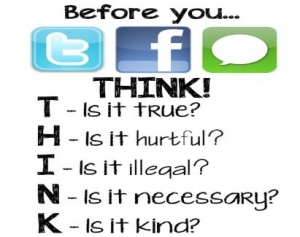
Use the Think acronym
Additional challenges for foster carers and adopters
In my previous article I wrote about some additional challenges for foster carers, as well as positive aspects of using the internet to manage contact and life story work.
If there are enhanced requirements from your agency or local authority with regards to a child whose location and identity may need to be protected from birth family, be mindful of sharing photos and other information online. Parents who want to find a child can use the internet in very sophisticated ways to do this. We can’t prevent this but can be aware.
Sharing photos online – check the requirements for posting any photos of the young person online, and make sure school, sports clubs, family members and friends are aware of any restrictions. If a child’s photo (image) is allowed in some circumstances think about geolocation tags and what the child is wearing or carrying – such as school uniform or carrying a shopping bag from a store that is only in a certain part of the country. Be mindful that a child, or carer, can be searched for by uploading an existing picture into Google reverse image search.
Posting pictures of children online – even if there are no safeguarding issues always be mindful about what is a parental responsibility decision by the local authority. This not only applies to posting pictures, but setting up an email address, managing existing and new social networking accounts and in general uploading any data, such as applying for a bus pass for a young person or a football season ticket. The COPPA ruling is not clear and it is always advisable to seek consent from the responsible LA as part of a child’s care plan or delegated authority decision tool.
Summary
Looking after ourselves and protecting our online identity is a requirement for all professionals working with children. As a digital parent we must model responsible online behaviour and this can start by maintaining our professional identity online and having a positive digital footprint.